
Learn how teams are building and operating AI systems at scale. Join us in Newcastle for AI in Production 2026 on 4–5 June.
items
Menu
  • About
    • Overview 
    • Join Us  
    • Community 
    • Contact 
  • Training
    • Overview 
    • Course Catalogue 
    • Public Courses 
  • Posit
    • Overview 
    • License Resale 
    • Managed Services 
    • Health Check 
  • Data Science
    • Overview 
    • Visualisation & Dashboards 
    • Open-source Data Science 
    • Data Science as a Service 
    • Gallery 
  • Engineering
    • Overview 
    • Cloud Solutions 
    • Enterprise Applications 
  • Our Work
    • Blog 
    • Case Studies 
    • R Package Validation 
    • diffify  

Our Logo In R

Author: Colin Gillespie

Published: February 1, 2018

tags: r, tidyverse, ggplot2, ggalt, theme_void

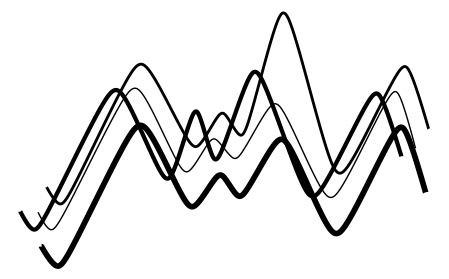
Hi all, so given our logo here at Jumping Rivers is a set of lines designed to look like a Gaussian Process, we thought it would be a neat idea to recreate this image in R. To do so we’re going to need a couple packages. We do the usual install.packages() dance (remember this step can be performed in parallel).

install.packages(c("ggplot2", "ggalt", "readr"))

Do you use Professional Posit Products? If so, check out our managed Posit services

We’re also going to need the data containing the points for the lines and which set of points belongs to which line. There is a Gist available to download via Jumping Rivers. To read in the CSV file we’re going to use the raw data link.

(dd = readr::read_csv("https://goo.gl/HzNbAp", col_types = "ddc"))
## # A tibble: 40 x 3
##       x     y type
##   <dbl> <dbl> <chr>
## 1  36.9  -311 1
## 2  67.9  -332 1
## 3 179    -156 1
## 4 254    -259 1
## # ... with 36 more rows

The data set contains three columns, x, y and type, where type indicates the line. Let’s start with a standard geom_line()

library("ggplot2")
g = ggplot(dd, aes(x, y))
g + geom_line(aes(group = type))

The graph shares similarities with our logo, but is too discrete. To smooth the curve, we’ll use a function from the {ggalt} package

library("ggalt")
g + geom_xspline(aes(group = type), spline_shape = -0.3)

The function geom_xspline() is the X-spline version of geom_line(), drawing a curve relative to the observations. The parameterspline_shape = -0.3 controls the shape of the spline relative to the observations. This can be a number between -1 & 1. Basically, -1 = bumpy lines, 1 = flat lines.

Next we’ll change the widths of the lines

(g1 = g  + geom_xspline(aes(size = type, group = type), spline_shape = -0.3) +
  scale_size_manual(values = (4:1)/2, guide = FALSE))

The scale_size_manual() function enables us to control the line widths. Finally, we remove the background

g1 + theme_void()

The function theme_void() does what it says on the tin it gives us a theme completely void of everything. Bar the lines of course.

That’s all for now. Thanks for reading! :)


Jumping Rivers Logo

Recent Posts

  • Reproducible Analytical Pipelines 
  • Three Posit Platform Features Worth Knowing About 
  • Is Your Dashboard User Friendly? 
  • AI in Production 2026 Workshops: What’s Coming in June 
  • Data Processing in Pandas and Polars: Free Jumping Rivers Webinar 
  • Jumping Rivers Now Approved to Sell Services Through DOS7: Crown Commercial Services 
  • Keeping Posit Environments Reliable in Production: Free Jumping Rivers Webinar 
  • Building a Robust .gitconfig 
  • Using {ellmer} for Dynamic Alt Text Generation in {shiny} Apps 
  • Why Submit to AI in Production: Speaking as a Tool for Better Work 

Top Tags

  • R (248) 
  • Rbloggers (191) 
  • Pybloggers (94) 
  • Python (94) 
  • Shiny (64) 
  • Events (28) 
  • Machine Learning (27) 
  • Training (27) 
  • Conferences (21) 
  • Tidyverse (17) 
  • Statistics (15) 
  • Packages (13) 

Authors

  • Amieroh Abrahams 
  • Russ Hyde 
  • Sebastian Mellor 
  • Myles Mitchell 
  • Colin Gillespie 
  • Theo Roe 
  • Tim Brock 
  • Shane Halloran 
  • Gigi Kenneth 
  • Keith Newman 
  • Pedro Silva 

Keep Updated

Like data science? R? Python? Stan? Then you’ll love the Jumping Rivers newsletter. The perks of being part of the Jumping Rivers family are:

  • Be the first to know about our latest courses and conferences.
  • Get discounts on the latest courses.
  • Read news on the latest techniques with the Jumping Rivers blog.

We keep your data secure and will never share your details. By subscribing, you agree to our privacy policy.

Follow Us

  • GitHub
  • Bluesky
  • LinkedIn
  • YouTube
  • Eventbrite

Find Us

The Catalyst Newcastle Helix Newcastle, NE4 5TG
Get directions

Contact Us

  • hello@jumpingrivers.com
  • + 44(0) 191 432 4340

Newsletter

Sign up

Events

  • North East Data Scientists Meetup
  • Leeds Data Science Meetup
  • AI in Production
British Assessment Bureau, UKAS Certified logo for ISO 9001 - Quality management British Assessment Bureau, UKAS Certified logo for ISO 27001 - Information security management Cyber Essentials Certified Plus badge
  • Privacy Notice
  • |
  • Booking Terms

©2016 - present. Jumping Rivers Ltd